
Fraudsters have created a fake version of ‘Diy’ and are tricking Ukrainians into installing an APK file

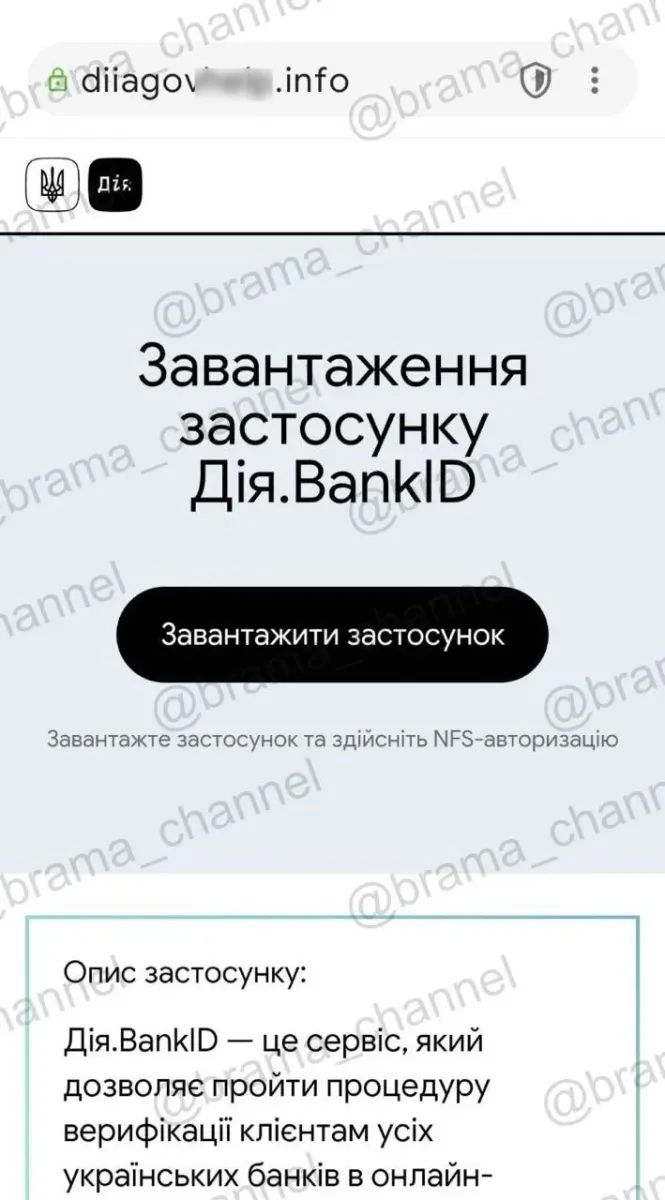
The Brama project has reported on the scam. The official “Diya” portal also reminds users that government services are available via the official website diia.gov.ua, and that the app should only be downloaded from official app stores.
A new phishing scam has been detected in Ukraine, in which fraudsters are posing as the government service “Diya.BankID”.
The attackers have created a fake webpage that visually mimics the interface of “Dii” and BankID. The aim of the scam is to trick users into downloading a third-party file onto their smartphone and gaining access to their personal data.
The main sign of a fake is the website address. The official “Diya” portal operates on the domain diia.gov.ua. If the page has a different extension or a similar but unofficial address, it may be a phishing site.
How the scam works
The fake website does not redirect the user to Google Play or the App Store.
Instead, the page offers to download the file directly from the browser. In the reported scam, the file had the .apk extension, specifically with a name such as client-with...3U2KT.apk.
An APK is an installation file for Android. The format itself is not inherently malicious, but downloading such files from unknown websites poses a serious risk to your smartphone’s security.
What a malicious app can do
Once installed, a suspicious app may request access to SMS messages, notifications, files, contacts or the phone’s internal memory.
Such permissions can allow fraudsters to intercept verification codes, access messages, collect personal data and monitor the user’s actions on the device.
It is precisely through such permissions that attackers can gain access to banking apps, accounts on messaging apps or other services that use SMS or notification-based verification.
How to spot a fake “Diya”
The official “Diya” app should only be installed via Google Play or the App Store.
Government services do not distribute APK files via third-party websites, random links, messaging apps or pages with unknown domains.
If a website asks you to download the app directly from your browser, this is a sign of fraud.
It is also worth checking the page address before logging in. Even if the website looks similar to “Diya”, a fake domain may lead to a phishing page.
What to do if the file has already been installed
If a user has already downloaded or installed a suspicious APK file, it must be deleted immediately.
After that, you should scan your smartphone with antivirus software, change passwords for important services, and check your activity in banking apps.
You should also review the permissions granted to the suspicious app and revoke access to SMS messages, notifications, files and other sensitive data.
If you suspect that fraudsters may have gained access to your accounts, you should contact your bank immediately and block any suspicious transactions.
Why is this dangerous
Phishing that uses the branding of government services relies on trust.
The user sees a familiar design, logo and the name “Dii”, so they may not immediately spot the fake.
Fraudsters use this effect to force people to act quickly: click a button, download a file, grant permissions or enter personal details.
Such schemes can lead to loss of access to bank accounts, theft of personal information, or further attacks via messaging apps and email.
Follow us on Telegram